

AI geography marking for schools
Department for Education · Competition for Innovation winner
Geography teachers get a first draft of their marking, written against their own department’s mark scheme. They edit that draft and approve the grade before a student sees any of it.
Overview
OpenKit won a Department for Education Competition for Innovation award to build Rubrical, a generative AI tool that helps teachers assess progress and give feedback on their students’ work. The Department is the customer and reviews delivery against performance targets it set at the outset. The product is OpenKit’s own.
One call for interest through the geography teaching community brought in twenty teachers inside a fortnight. Eighteen of them named marking and feedback as the job they most needed help with. Rubrical marks geography alone, because a marking tool has to hold one subject’s mark scheme well enough for a department to defend the marks it produces at moderation.
52%
less marking time, reported by teachers in the developer’s tests and recorded by the Department for Education in its schools white paper.
92%
of marks matched the senior teacher’s grade on GCSE geography answers held back for testing, against 67% for generic AI tools on the same rubric.
2.5x
more detailed feedback than teachers had time to write by hand on the same work.
14
schools live, marking geography from Key Stage 3 to GCSE.
95%
teacher satisfaction with the marking and feedback Rubrical drafts for them.
Approach
What OpenKit built
Rubrical drafts the marking against each criterion of the department’s own rubric and mark scheme. Work comes in by upload or straight from Google Classroom or Microsoft Teams.
- A marking model tuned for geography and trained on the Department’s content store.
- PEEC+, a framework OpenKit developed and validated for long-form answers, which reads an answer as an argument and marks how the case is built.
- Class-level analytics showing strengths, gaps and common misconceptions by topic, so a teacher can aim the next lesson at what the class got wrong.
- A lesson plan generator, built because teachers kept asking for help with the other half of the job.
- Refinements for SEND and EAL that the teacher advisory board asked for, in the product before the first schools marked with it.
Teachers on the advisory board score what gets built next. Every feature was signed off through the board before it shipped, with each design decision written down alongside the reasoning behind it.
Oversight
How a teacher reviews a mark
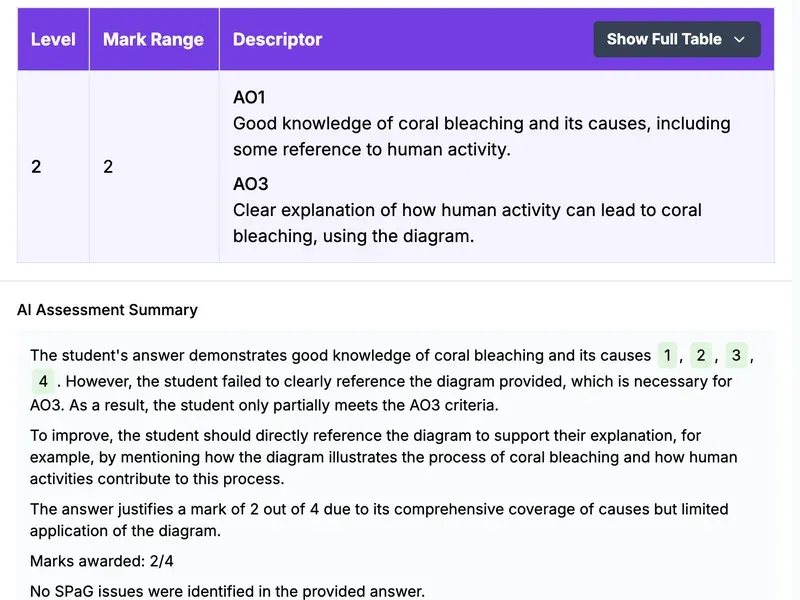
The review screen puts the student’s answer on the left and the rubric level, mark range and descriptor on the right. Underneath, a written summary explains which parts of the answer earned what and where the evidence was missing. The teacher adds their own comment, then approves the assessment or sends it back to be revised. Nothing reaches a student until a teacher has approved it.

Result
Live in fourteen schools
Rubrical is now in production, with marking behind a trust-wide moderation framework and service levels in place.
Demand came back for whole departments and for Key Stage 3 alongside GCSE, so the commercial model moved from individual teacher subscriptions to department-level licensing.
The figures above come from Rubrical’s own tests with teachers. The Department for Education records the marking figure on page 98 of its schools white paper, Every child achieving and thriving (February 2026): “Teachers report a 52% reduction in marking time in the developer’s tests.” The same entry records the Department’s initial £1m award in 2024 and a further £1m from Innovate UK.
The Department approved Rubrical’s data protection impact assessment. Data stays in the UK and the platform operates to UK GDPR, with sign-in through each trust’s own login.
Other engagements
What could your business do with AI?
Find out with experts who become part of your team. We uncover opportunities, get ideas working, and help your people build on the results. We reply within one working day.
Get in touch AI Audit